
The lab setup that i will be using in this blog series is quite extensive. Yours does not have to be! Some of the options that i will be showing will add resiliency to your infrastructure, but most things only add capacity. You will need to determine what business requirements you have, and from that create a list of infrastructure that you require. Most capabilities shown could actually be run on a stack with as little as 3 hypervisors.
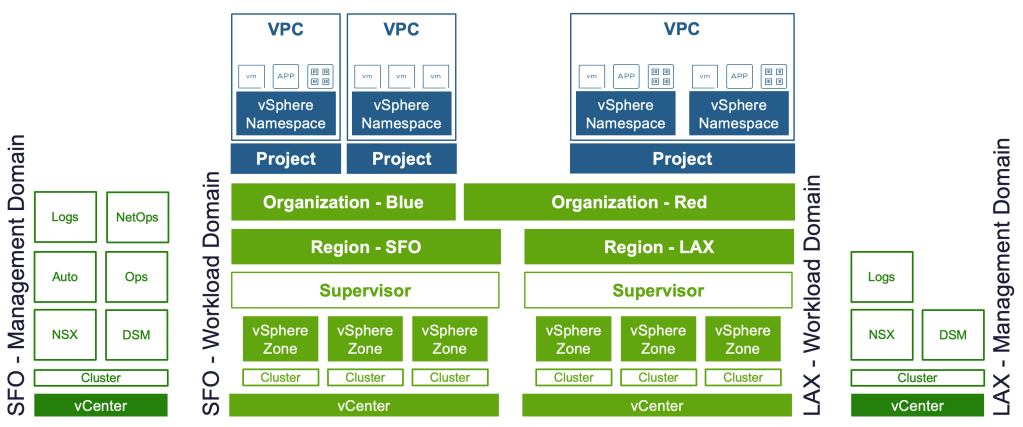
This is what the lab setup looks like in the environment that i will use to showcase everything in.
It’s a single Fleet, with two Instances. What this means is that each Instance is a Management Domain, and a Workload Domain, but they are both managed by the same Fleet appliances (Operations, Automation). Some appliances are local to each of the Instances (vCenter, NSX Managers, NSX Edge Clusters, Operations for Logs, etc. Some appliances (Operations, Automation) can in the event of a disaster, or planned outage be failed over from SFO, to LAX.
In this environment i will show how multiple clusters (3) can be used to increase the resiliency of the Supervisor, and clustered applications. This is pretty extreme resilience, and may not be required, you could do with just one cluster. Each Cluster will represent one vSphere Zone.
The Supervisor can then be deployed in either a “simple” manner in just one Cluster/Zone, or distributed across 3 zones.
We will then abstract one or multiple Supervisors into a Region. It’s hopefully clear but a region would be a geographically redundant location, such as either distinct datacenters, or cities. In this demo we’re using SFO (San Francisco) and LAX (Los Angeles).
As a provider, we can now carve out resources (cpu, ram, disk, network) to different Organisations/Tenants. In this series i’ll be using the examples Blue and Red, representing either two completely different companies, or business units.
Once the Org has recieved resources, we’ll continue to drill down and distribute resources among Projects and Namespaces.
 Every day is a learning day